
こんにちは、なかにしです。
個人アプリやプロトタイプを作成するとき、ついスピードを優先してしまって、テストを疎かにしてしまうことが多いです。
そこで、久々にTDDの記憶を呼び起こそうと思います。
TDD(テスト駆動開発)とは
すごく簡易的な言い方をすると、
「実装 → テストコードを書く」ではなく「テストコードを書く → 実装」で進めていこうよという開発手法です。
具体的には、Red → Green → リファクタ の3段構えです。
①まずテストを書き、実行する:Red(失敗)になる
②テストが通るよう、コードの綺麗さなどは気にせずに実装する:Green(成功)になる
③コードをリファクタし、整形や網羅性の検証を行う:リファクタ
テストコードを先に書くことで、今から実装するモノがどんな動作をすべきかをクリアにすることができ、仕様の考慮漏れや実装漏れを事前に防ぎやすくなります。
AIに書かせればいいじゃん問題
前提として、おっしゃる通りです。
効率化できる部分は効率化するに限ります。
AIを使っていると、
現在のデファクトスタンダードや、それが使用されることになった背景を見逃しがちです。
私は「手を動かして調べたり実装したりする」ことで記憶に残り、知識として身に着くと思っている昔の人間なので、今回はデファクトスタンダードを再認識する為に行いました。
テスト対象のアプリケーション
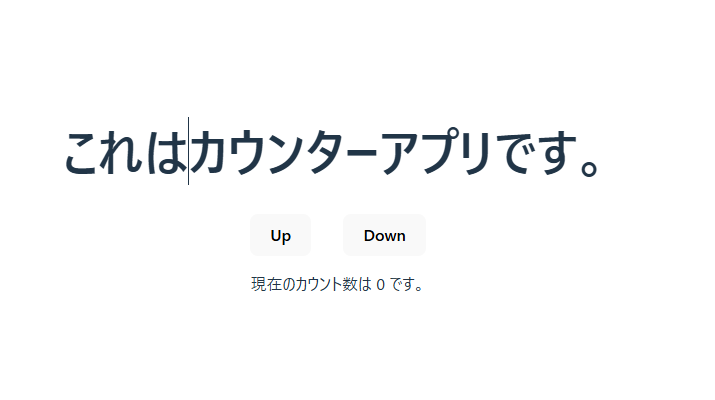
今回は、以下のような カウンターアプリ を作成したいとします。
成果物
今回作成したコード類は、以下に格納しています。
https://github.com/Naka-nishi-s/TDD_practice_React
アプリのひな形を準備
vite × Reactで、アプリのひな形を作っていきます。
npm create viteテスト用のライブラリが入っていないので、追加でインストールします。
今回は、vitest と testing-library を使用します。
npm install -D vitest @vitest/coverage-v8 @testing-library/react @testing-library/jest-dom @testing-library/user-event jsdomそして、テストの実行コマンドを package.json の scripts に追記します。
  "scripts": {
    "dev": "vite",
    "build": "tsc -b && vite build",
    "lint": "eslint .",
    "preview": "vite preview",
    "test": "vitest",  // 追記
    "test:coverage": "vitest --coverage"  // 追記
  },
Test用に設定ファイルを修正していきます。
{
  "compilerOptions": {
    "types": ["vitest/globals"],
    "tsBuildInfoFile": "./node_modules/.tmp/tsconfig.app.tsbuildinfo",
    "target": "ES2020",
    "useDefineForClassFields": true,
    "lib": ["ES2020", "DOM", "DOM.Iterable"],
    "module": "ESNext",
    "skipLibCheck": true,

    /* Bundler mode */
    "moduleResolution": "bundler",
    "allowImportingTsExtensions": true,
    "isolatedModules": true,
    "moduleDetection": "force",
    "noEmit": true,
    "jsx": "react-jsx",

    /* Linting */
    "strict": true,
    "noUnusedLocals": true,
    "noUnusedParameters": true,
    "noFallthroughCasesInSwitch": true,
    "noUncheckedSideEffectImports": true
  },
  "include": ["src", "src/component/Button/__tests__"]
}
import react from "@vitejs/plugin-react-swc";
import { defineConfig } from "vitest/config";
// https://vite.dev/config/
export default defineConfig({
plugins: [react()],
test: {
environment: "jsdom",
globals: true,
setupFiles: "./src/setupTests.ts",
},
});import "@testing-library/jest-dom";ディレクトリ構成
以下の構成にしました。
基本的には__tests__配下にまとめて一括テストを可能にしています。
e2eテストはアプリ全体を「外から」テストする役割なので、srcの外に配置しています。
├─ coverage/
├─ node_modules/
├─ public/
│   └─ vite.svg
│
├─ tests/
│   └─ e2e/
│
├─ src/
│   ├─ assets/
│   │
│   ├─ components/
│   │   └─ Button/
│   │       ├─ Button.tsx
│   │       └─ __tests__/
│   │           └─ Button.test.tsx
│   │
│   ├─ features/
│   │   └─ counter/
│   │       ├─ Counter.tsx
│   │       └─ __tests__/
│   │           └─ Counter.test.tsx
│   │
│   ├─ App.tsx
│   ├─ main.tsx
│   ├─ App.css
│   └─ setupTests.ts
│
├─ index.html
├─ package.json
├─ tsconfig.json
├─ tsconfig.app.json
├─ tsconfig.node.json
└─ vite.config.ts
参考:【Jest_59】 どのディレクトリにテストを書く?
https://note.com/happy_avocet7237/n/n0bb747411696
テストを書く
テストを書いていきます。
import { render, screen } from "@testing-library/react";
import { Button } from "../Button";

test("should first", () => {
  console.log("first");
});

test("Button Render", () => {
  render(<Button onClick={() => {}}>AAA</Button>);
  expect(screen.getByRole("button")).toBeInTheDocument();
});
import { render, screen } from "@testing-library/react";
import userEvent from "@testing-library/user-event";
import { Counter } from "../Counter";
test("初期値は 0", () => {
render(<Counter />);
expect(screen.getByText(/現在のカウント数は 0/)).toBeInTheDocument();
});
test("Up を押すと +1 される", async () => {
render(<Counter />);
await userEvent.click(screen.getByRole("button", { name: "Up" }));
expect(screen.getByText(/現在のカウント数は 1/)).toBeInTheDocument();
});
test("Down を押すと -1 される", async () => {
render(<Counter />);
await userEvent.click(screen.getByRole("button", { name: "Down" }));
expect(screen.getByText(/現在のカウント数は -1/)).toBeInTheDocument();
});
テストを実行
以下コマンドでテストを実行します。
npm run test:coverage失敗しました。順調です。
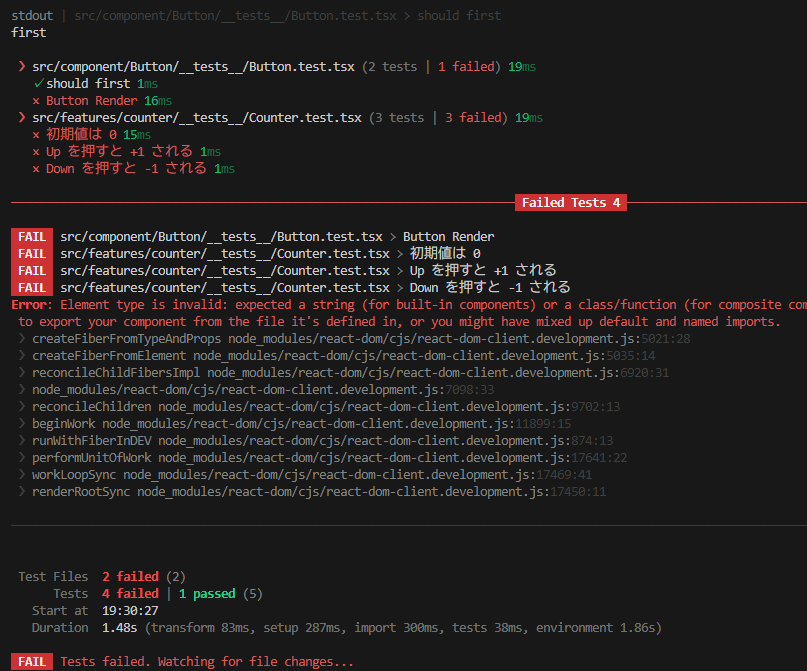
このテストが通るように、実装をしていきます。
実装
ボタンとカウンターを実装します。
export const Button = ({
  onClick,
  children,
}: {
  onClick: () => void;
  children: React.ReactNode;
}) => {
  return <button onClick={onClick}>{children}</button>;
};
import { useState } from "react";
import { Button } from "../../component/Button/Button";
export const Counter = () => {
const [count, setCount] = useState(0);
const countUp = () => {
setCount((prev) => prev + 1);
};
const countDown = () => {
setCount((prev) => prev - 1);
};
return (
<>
<h1>これはカウンターアプリです。</h1>
<div style={{ display: "flex", gap: "2rem", justifyContent: "center" }}>
<Button onClick={countUp}>Up</Button>
<Button onClick={countDown}>Down</Button>
</div>
<p>現在のカウント数は {count} です。</p>
</>
);
};これで、テストが通るようになりました。(Green)
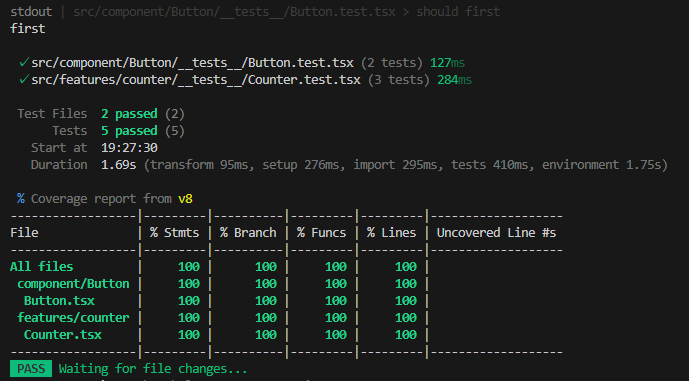
ここで、必要に応じてリファクタを行います。
今回は簡単な実装だったので、リファクタは必要ありませんでした。
この Red → Green → リファクタのサイクルを回していきます。
さいごに
久々に自力でテストを作成しました。
慣れは必要ですが、やはりTDDは理に適っているなと思います。
手を動かして書いてみると、結構大変ですね。
AI様様ですよホント…
「AIが言ってたので正しいと思います」人間にならぬよう、定期的に手を動かしていこうと思います。
今回はここまで!
Enjoy Hacking!!